
Who Knew Feature Flags Would Save AI Coding


From "good enough" to production‑ready, fast
When a new component glows in your IDE, and your AI assistant says, "Ready for deployment." What do you do? You could launch it wide, hit the big green button, and pray for no fires. But you don't. Not anymore. You wrap it in a feature flag.
Here's the story of how I moved from "AI wrote this" to "shipping it live". Safely, quickly, iteratively.
Why Feature Flags Make Sense for AI‑Driven Code
When you let an AI generate components (front‑end UI, backend service, whatever), you're riding high on velocity. But velocity without control is asking for trouble. Bugs, weird edge‑cases, and performance surprises are all waiting.
Feature flags give you a middle ground:
- You wrap the new component behind a flag.
- You release it to a limited audience such as your team, product manager,
or a salesperson. - You observe behavior in production with real data and real users without
risking the whole user base.
In my workflow, I push the AI‑generated component, flip the flag for myself and the product manager. We use it, poke it, and show it to a customer. Then, when it holds up, we flip it on for everyone.
I did this recently when I used AI to build a data entry screen from one that just displayed the data. I wrapped the edit and save buttons in a feature flag. Then, I turned it on for the PM and a user who had been asking for the feature. It allowed us to see it work in production with production data. All while not changing the functionality for the rest of the users.
That's the fastest, safest route from "AI‑generated" to "production‑ready."
"Perfect is the enemy of done". Wrap it, ship it, and watch it run.
What this looks like in practice
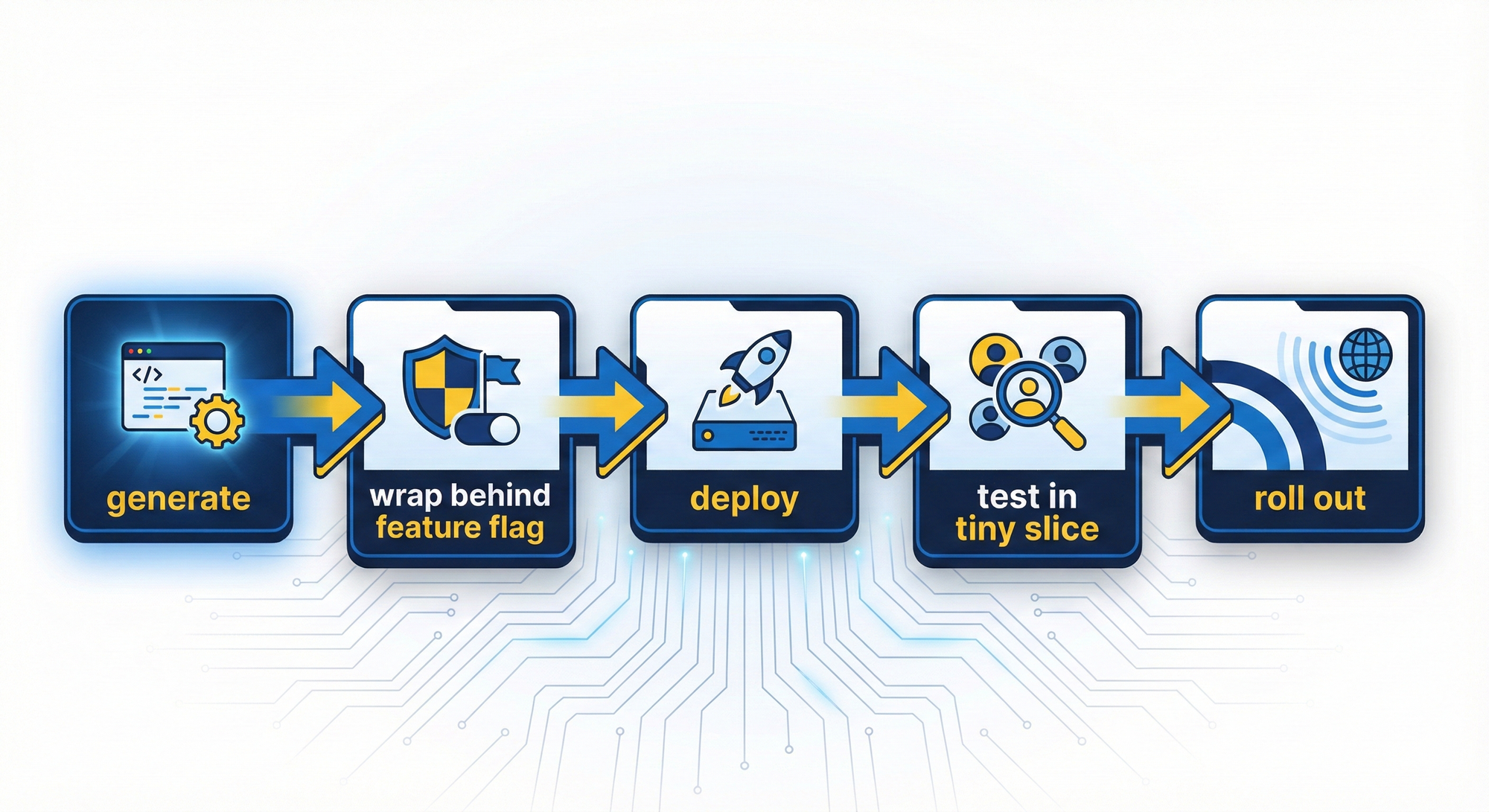
- Generate a component via your AI editor (mine is Cursor).
- Wrap it with a feature flag: conditionally render it, toggle the logic path.
- Deploy to production, but keep the flag OFF globally.
- Enable the flag for a small audience: you, stakeholders, and
specific user IDs. - Monitor: error rates, performance metrics, and user feedback.
- Iterate: fix issues, refine.
- Roll out: flip the flag ON for a broader or full audience once
confident.
This lets you ship early and often, without being held hostage by “there’s one more edge-case” syndrome.
How to Add the Devcycle MCP Server to Your Workflow in Cursor
If you're using the MCP protocol for AI‑powered tooling (for example, Cursor or similar), you can plug in DevCycle's MCP server in minutes.
From DevCycle's official docs:
- Add the DevCycle MCP server endpoint in your AI client configuration.
For example in~/.cursor/mcp_settings.json:
{
  "mcpServers": {
    "DevCycle": {
      "url": "https://mcp.devcycle.com/mcp"
    }
  }
}- In Cursor you'll see "DevCycle - Needs login". Click to authenticate via browser, choose your organization, and you're connected. Now you can manage flags, variables, targeting, and analytics via the MCP interface, all from your AI‑powered editor.
- Once connected, you can then install DevCycle into the project using the prompt on each of the Installation pages for each SDK, such as for React.
- Now add a feature flag: "create a new feature flag called new-intro-text."
- Select the existing text and "replace this text with the value of the new-intro-text feature flag, set the default to be an empty string."
- Change the targeting rules: "Change the All users targeting rule for new-intro-text to serve off. Then create a new rule to check if the user's email ends in @example.com and then serve on."
- In production, you deploy that code, but leave
new-intro-text
flag OFF globally. Then you enable it for you/your team. Once happy, open it to all users.
Using DevCycle MCP and Cursor together creates a smooth feedback loop:
AI writes, you deploy, you test live, and you refine, all without full rollout risk.
Why This Matters for Ai‑Driven Teams
- Speed: You get components into production early on.
- Risk control: Only a subset sees the new code until you're confident.
- Feedback loop: Real‑world usage data, not just local tests.
- Iteration-friendly: AI writes, you enable, you refine, then rinse and repeat.
When you're using AI tools to generate code at a rapid clip, the bottleneck becomes validation and control. Feature flags become your guardrails. They let you move fast and safely.
Final Thoughts
AI‑assisted development is here. The cursor blinks, and magic flows. But magic without discipline becomes mayhem. The simple pattern of generate, wrap behind a feature flag, deploy, test in tiny slice and rollout is a backbone for AI‑driven dev teams.
So, next time your AI writes a component, don't hesitate to wrap it in a feature flag, ship it to a safe audience, and observe how it behaves. Then let it fly wide.
Your AI‑enabled future is ready. Controlled, observable, and smooth.